Strings in Python
Discover how Python treats text — slicing, formatting, methods, and more

Overview → In this article, we’ll explore about strings in Python.
Strings
The first question that might come to your mind is: What is a string?
It’s not complicated at all! A string is simply a sequence of numbers, alphabets, or characters enclosed within single quotes (‘ ‘) or double quotes (“ “).
If you're familiar with the C language, you might know about the char data type, which stores a single character. But don’t worry if you don’t know C in Python, there’s no separate type for a single character. Everything enclosed in quotes is considered a string, whether it’s a single character or a long sentence.
You can easily understand strings through examples
A = "Apple" # that is a string
B = "banana"
c = "cat"
""" these are string """
Length of string
you can understand length of string as how many character it has if it contains 5 character it’s length is 5. for example:
A = "Akash" # there are 5 characters in string so its length is 5
B = "Hello, World!" # there is 12 characters, you will think how 12 there is 11 character 😁 but python
                    # treat space( ) as 1 character so thats why the length of string is 12
indexing in string
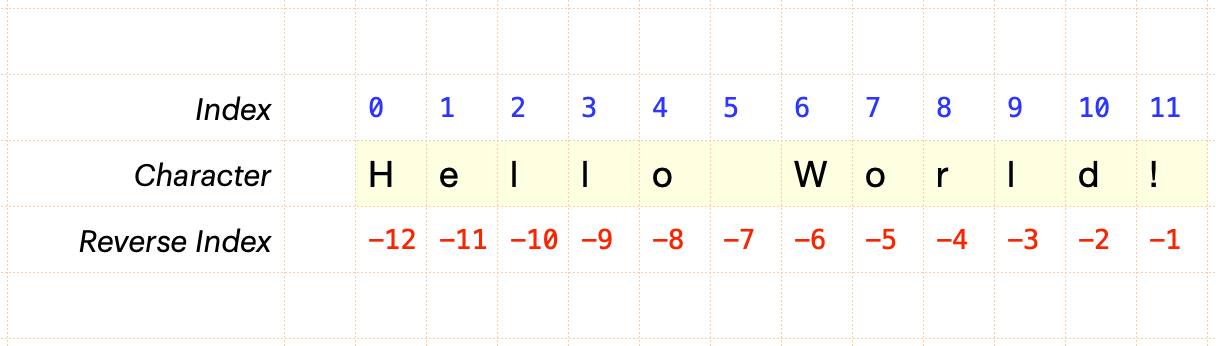
Indexing in a string means giving a number to each character. This helps us easily use any character from the string in any part of the code. In Python, there is a fixed way of indexing, which is also used in other sequences like lists and tuples.
Indexing starts from 0, which means the first character of the string gets the number 0. After that, each character gets a number that is 1 more than the previous one (like 0, 1, 2, and so on). you can understand it by image given below
String slicing
string slicing means cutting string by specified length. the syntax of string slicing is given bellow and also how its work.


Inbuilt function of strings
1. upper( )
Converts all lowercase characters in a string into uppercase.

2. lower( )
Converts all upper characters in a string into lowercase.

3. title( )
convert string in title case.

4. capitalize( )
Convert the first character of a string to uppercase and remaining character in lowercase.

5. swapcase( )
convert upper case characters in lower and lower in upper case

6. replace(“old sub string” , “new substring” )
the replace( ) method does not modify the original string, because strings are immutable. Instead, it creates and returns a new string where the specified substring is replaced by the new substring

7. split( )
It breaks the string by a given separator. Whitespace is the default separator if any separator is not given.

8. strip( )
remove all white spaces from start and end of string.

9. index( )
Returns the index of an existing substring; if the substring does not exist, it raises an error.

10. find( )
It also returns the index like the index( ) function we discussed above, but it does not raise an error when the substring is not present instead, it returns -1.

11. count( )
count number of specified substring present in a string.

12. isalpha( ), isdigit( ), isfloat( )
isalpha( ) => it check all the character in string is alphabet or not if yes then it return true otherwise return false.

isdigit => Returns “True” if all characters in the string are digit characters.
isdecimal( ) => Returns “True” if all characters in the string are decimal characters.
isnumeric( ) => Returns “True” if all characters in the string are numeric character
Difference: isdecimal( ) vs isdigit( ) vs isnumeric( )
isdecimal => Only accepts base-10 decimal digits.
isdigit => Includes decimal digits and superscripts.
isnumaric => include Decimal digits, Vulgar fractions (
½,⅓), Roman numerals (Ⅻ), Digits from other languages.
string concatenation
1. using + operator

2. using Formatted Strings operator

#chaicode
