What are Operators python ?
In this article, you will understand what are operators and how they work.

Operators
Operators are used to perform specific operations on operands (the values or variables on which the operations are performed).
Types of operators
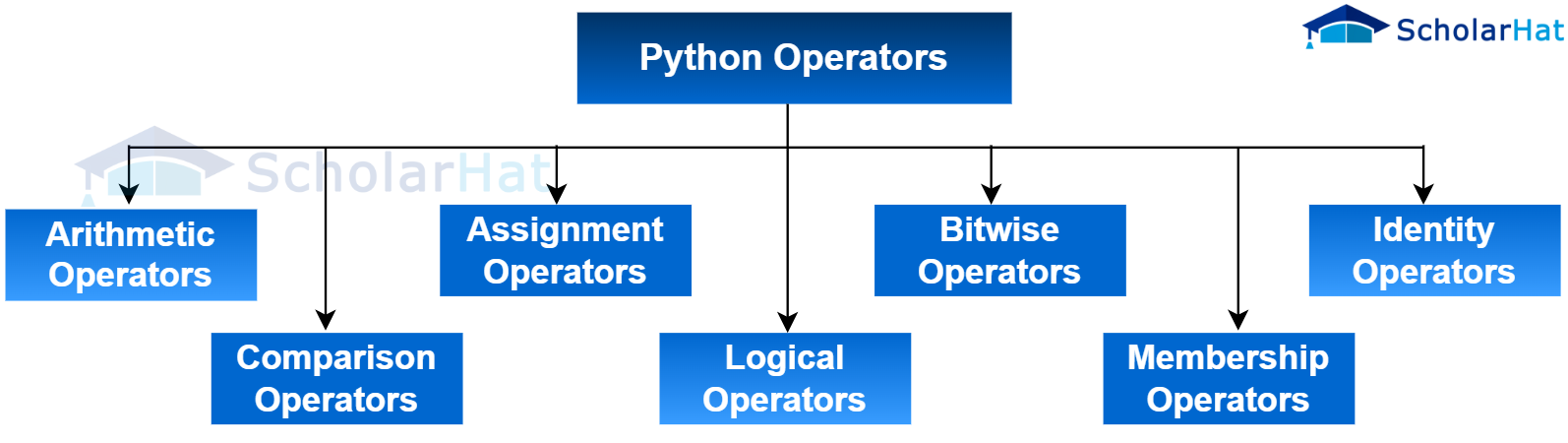
1. Arithmetic operation
This operation is used for addition (+), multiplication (*), etc., on numbers, and is also sometimes used with strings. We will understand how they work with strings later in this article.
''' how they used and what output they gives '''
x = 2
y = 4
z = 3
print(x+y) # + operator add two no's. output = 2+4 =>6
print(x-y) # - operators substract the first no with secont no. output = 2-4 =>-2
print(x*y) # * multiply x and y. output = 2*4 =>8
print(x**y) # ** the result gives x raised to power y. output = 2^4 =>16
print(y/x) # / divide y by x. output = 4/2 => 2
print(y//z) # // gives only integer part of division. output = 4/3 => 1
print(y%z) # % gives reminder obtained by y/z. output = 4/3 => 1
print(y%x) # % gives reminder obtained by y/z. output = 4/2 => 0
2. Comparison operator
This operator is used to compare two variables and returns a Boolean value — either True or False.

in above image comparison operator is explained in detailed. in image there is two section in top codes and in comment which contain how code run and give output and in bottom section the output of code is written in terminal.
3. Logical operators
Logical operators are very interesting. They can take one or more inputs. For example, if we have a and b, applying a logical operator like and or or will return one of the values depending on their truthiness. However, not is different — it takes only one input and returns either True or False based on whether the input is truthy or falsy.

in above image logical operator is explained in detailed.
4. Assignment operators
Assignment operators are used to assign values to variables.
x = 4 # here '=' is assignment operator which assign value 4 in variable x.
x+=5 # '+=' it is also assignment operator it says add 5 to x and after that the value of x will become x=9
x-=5 # '-=' we can also think that of x=x-5
'''same we can apply with all arithmatic operators like +,-,*,/ etc.
for more detailed explanation and practice you can explore this website
you can explore more about assignment operator in this link, click on it
5. Bitwise Operators
bitwise operator is very interesting operates which is work using binary numbers so before understanding bitwise operators we know about how decimal no converted into binary no.


by using above image you can understand how decimal no converted in binary no and how binary no in decimal.
1. Bitwise and(&) operator
The bitwise & operator compares each bit of two numbers from right to left (starting from the least significant bit). If both bits are 1, the result is 1; otherwise, it is 0.
For example 2 in binary is 10, 3 in binary is 11, if we apply & between 2 and 3 then it ill compare each bit starting from right to left and perform ‘and‘ operation on each bit. So we get 10 that is 2 in decimal number hence we get the output 2.

2. Bitwise or(|) operator
The bitwise | operator compares each bit of two numbers from right to left (starting from the least significant bit). If either one of bits is 1, the result is 1; otherwise, it is 0.
For example 2 in binary is 10, 3 in binary is 11, if we apply | between 2 and 3 then it ill compare each bit starting from right to left and perform ‘and‘ operation on each bit. So we get 11 that is 3 in decimal number hence we get the output 3.

3. Bitwise not(~) operator
its very interesting operator in python basically it invert all bits let suppose we have ~3 the binary of number 3 is 11 and in computer its generally stored in memory 8 bit so the no written in memory is 00000011 the most left side bit is sign bit which represent sign of no if 0 then its + if 1 its - . so ~ operator invert it and convert 1 to 0 and 0 to 1. so our no will become 11111100 now you can see the left side sign bit is 1 means negative so in this case python apply 2’s complement(trick for 2 compliment is left se start kro or jb tk 1 na aye same likho or jb 1 aa jaye tb uske bad se 0→1 and 1→0 kr do ) on it and convert it to 00000100 and return decimal of this binary no with - sign which is -4.if after inverting the no my msb is not 1 then you can directly convert it in binary no.
there is also a formula of finding ~n = -n-1, ~3 = -3-1 => -4 same answer comes above.

4. Bitwise xor(^) operator
bitwise ^ operator compare each bit of two number and if both are different it returns 1 otherwise it returns 0.
for example 2 in binary is 10, 3 in binary is 11, if we apply ^ on these two number the it will compare each digit and return 01. which is 1 in decimal no.

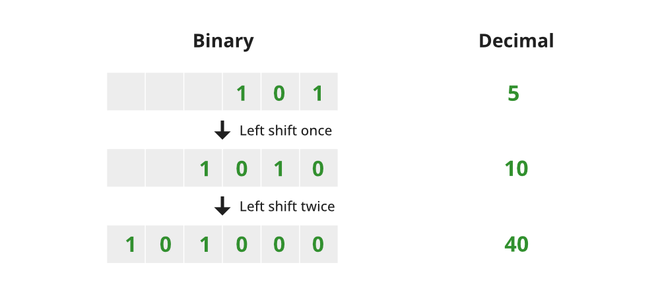
5. Bitwise left shift(< <) operator
bitwise < < operator work with two operators it shift the decimal no of left operand in left side by the value of right operand times.
for example my first operand is 5 and second operand is 1(5< <1), 5 in binary is 101 when we apply < < 1 operator on it it shift 101 by one place from left and the result is 1010 which is 10 in decimal no.

5. Bitwise right shift(> >) operator
bitwise > > operator work with two operators it shift the decimal no of left operand in right side by the value of right operand times.
for example my first operand is 5 and second operand is 1(5> >1), 5 in binary is 101 when we apply >> 1 operator on it it shift 101 by one place from right and the result is 10 which is 2 in decimal no.

6. Membership Operators
It's check if an element exists inside the right-side object then its return true otherwise false.
there are two types of membership operator in python: 1. in, 2. not in.

7. Identity Operators
identity operators returns True or False, for applying identity operators we must have two variable basically its compare address of both variable.

Mutable and Immutable

1. Mutable
Mutable means that once an object is created, its contents can be modified at any point in the code, without reinitializing it.
example of mutable is list, Dictionaries, Set.
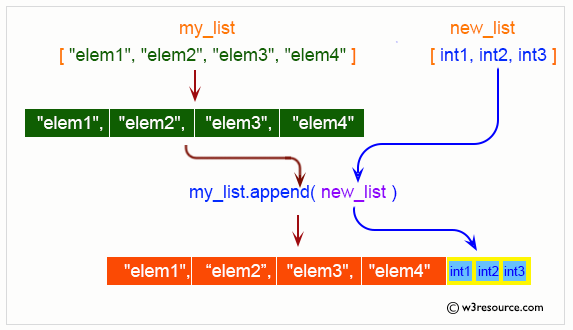
in above image you can see there is two list my_list, new_list and then we add new_list in my_list.

by using above two images you can understand what is mutable means.
2. Immutable
Immutable means that once an object is created, its contents cannot be modified at any point in the code, and any attempt to do so requires reinitializing it.
example of mutable is numbers, float, string, etc.

by using the above image you can understand what is immutable and below this there is image where is screenshot of code given which is explained in above image.

now you are thinking how integer is immutable when we change its value it not returns error the answer of that written in image which is below where i explained it using code and comments in code.

when two variable have same address ?
One important thing you can also notice is that if two variables have the same string, their addresses are the same. But when two lists have the same values, their addresses are different. This is because the concept of two variables sharing the same address applies only to immutable data types.
summary
- operator→ which perform operation on operands
| Arithmetic Operators | ** , + , - , * , / , // , % |
| Comparison Operators | \== , != , > < , >= , <= |
| Logical Operators | not , and , or |
| Bitwise operator | ~ , << , >> , & , ^ , |
| Identity operator | is , is not |
| Assignment Operators | '=', '+=', '-=', '*=', '/=', '//=', '%=', '**=', '&=', ' |
| Membership Operators | in , not in |
Mutable:
Objects that can be changed after creation.
ex → list, dictionary, set.Immutable:
Objects that cannot be changed after creation.
ex → integer, float, string, etc.
#ChaiCode
